DE
DE EN
ENCMM DATA Import
Importing measured values into the report
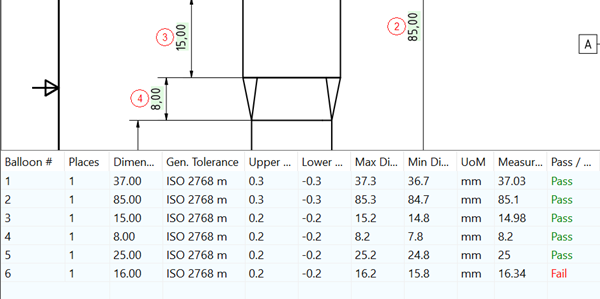
While the target values are read out when stamping the drawing (nominal dimensions including tolerances), the new “CMM Data Import” function allows these to be supplemented with the measured actual values. This enables a target/actual comparison within QA-CAD.
Start QA-CAD and open a drawing that does not yet contain any stamps.
- Start QA-CAD and open a drawing that does not yet contain any stamps.
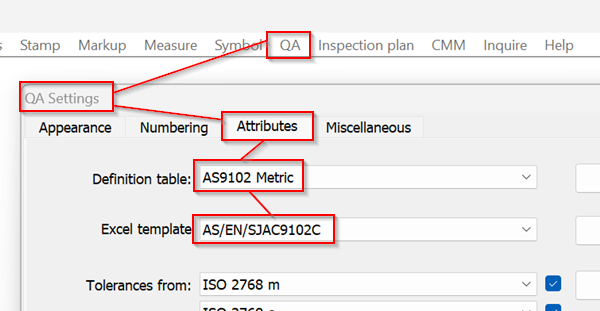
In the QS settings, select an appropriate Definition table and Excel template.
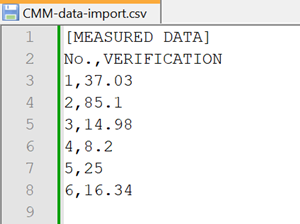
- This is what the CSV import file should look like.
The decimal separator can be a period "." or a comma "," .
If a comma is used, there must be a semicolon ";" between the balloon number and the measured value.
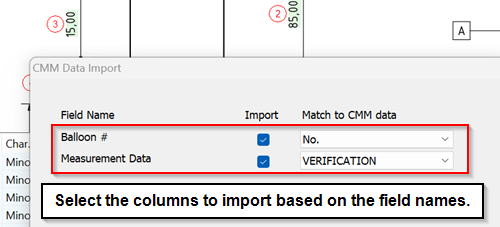
- Run CMM > Import CSV from the menu bar and select the appropriate CSV file. Select the columns to import based on the field names
- The list in the data window below the drawing can also be exported to an Excel report.